 OpenCUI
Appearance
Value recommendation
When you need to ask for a user's preference on a slot that has many potential values, it is often a good idea to offer the user a list of candidate values based on the application logic. This makes it easier for the user to converge to a workable choice. For example,
json
User: "Get me two tickets for Star Wars for tonight, please."
Chatbot: "What time? For Star Wars, we only have two showings left at 19:30pm and 21:30pm. Which one do you want?"
Instead of having many trials:
json
User: "Get me two tickets for Star Wars for tonight, please."
Chatbot: "Ok, what time?"
User: "18:30pm"
Chatbot: "Sorry, Star Wars at 18:30pm have sold out, please choose another time."
User: "19:00pm"
Chatbot: "Sorry, Star Wars at 19:00pm have sold out, please choose another time."
Overview
When a slot has a large set of potentially valid values from the user side, but a much more restrictive set servable from the business side, it is very useful to inform the user as early as possible about the acceptable values based on the business logic. Value recommendation is one way to communicate such restrictions so that the user can pick from a smaller set of pre-approved values by the business, instead of going through multiple rounds of trial and error.
Value recommendation is rather complex conversational component, consisting of
- Source: Where the builder can specify a code expression or skill that returns a list of values of the target type.
- Paging behavior: When the list is long, it is important to support 'page' navigation-like interactions:
- "Is there more options?" for next page.
- "Can you go back? I like to see these options again." for previous page.
- Item picking: Provide the ability to deal with selection expressions, both by index or by name:
| Selection | Examples |
|---|---|
| Can be expressed by the order in which they are placed | "the first one", "second" |
| Can be expressed through specific properties | "the red one", "the hot one" |
| Support primitive expressions and pronoun expressions | "this city", "over there" |
| Support don't care expressions | "don't care", "anything will do" |
- List rendering: Allow the builder to customize the template that verbalizes the offer list in different languages.
Note
Don't care expressions need to be defined in another annotation, but the interactive experience will be reflected here.
Aside from these main controls, OpenCUI value recommendation also comes with other bells and whistles to make it easy to adapt to real-world situations. For example, there is a hard and soft mode toggle, which indicates whether an option or value outside of what the bot offers is acceptable. There is also an annotation that allows you to customize the conversational behavior when the item list is empty or has just one entry.
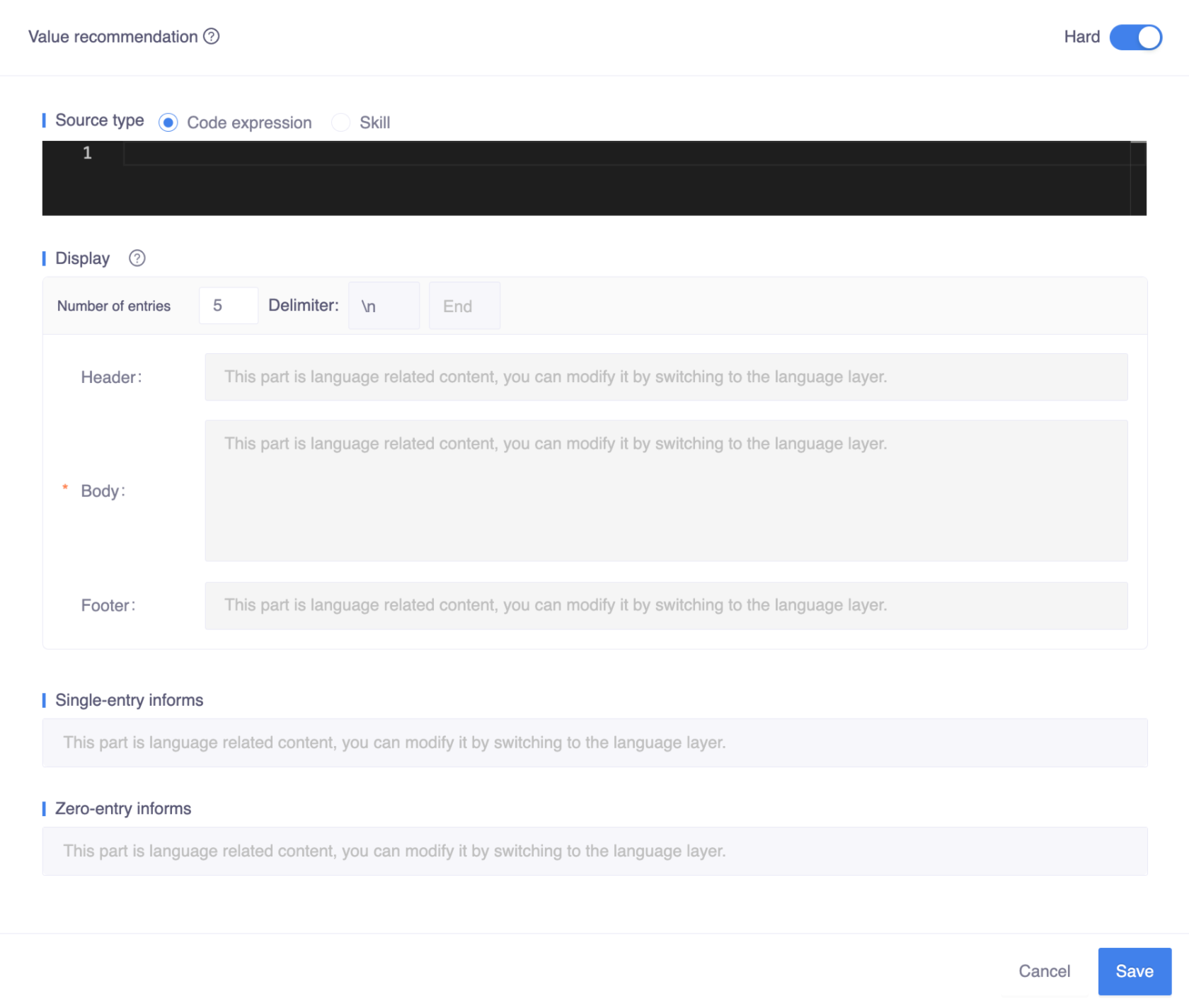
Value recommendations can be defined at the slot level (both entity slot or frame slot) or type level. If they are defined at the type level, the bot will recommend the entire frame/skill based on that recommendation. The configuration of value recommendation is done in the following UI:
How to use
There are many controls on the Value recommendation component configuration page, that can be used to design conversational interface for different use case, let's go over them one by one. There are many controls on the Value recommendation component configuration page that can be used to design a conversational interface for different use cases. Let's go over them one by one.
Hard mode
When the bot recommends options or candidate values for a given slot to the user, there are two different scenarios:
- When the number of the servable options is small enough, it can offer an exhaustive list of servable options. For example:
json
Chatbot: "Which color do you want on the tempo next percent? We only have white and also black left."- When there are too many options, it is not a good idea to list them all, particularly on a voice-only channel like a speaker. So it is a good idea to convey the suggestive nature of your offer:
json
Chatbot: "How can I help you today? Mr. Bond. For example, I can help you with your monthly payment, or check new balance."When the number of valid choices the business can serve is small, you can turn on the Hard toggle to control the conversational experience and communicate to the user that the choices you offer are the only ones that will be accepted by your business:

So if the item the user wants is not in the list of candidates, the bot will not try to fill the slot with the proposed value, i.e., going to the value check phase. Instead, it will stay at the prompt phase and give the user a default reply, such as:
json
Chatbot: "Sorry, we do not offer Star Wars at this time. The only available showtime for Star Wars is 8:00pm and 10:00pm. Which time do you prefer?"The exact script of the first part can be customized on the system skills io.opencui.core.BadIndex and io.opencui.core.BadCandidate by adding more replies.
The conversational behavior will also be customized under hard mode for cases when number of entries return the source is one or zero, which can be defined in
The conversational behavior will also be customized under hard mode for cases when the number of entries returned by the source is one or zero. This can be defined in Single entry informs and Zero entry informs.
Note
Customization of system skill will not only affect the current slot, but also the entire bot behaviors.
Two special cases
Whenever there are limited valid options for a slot based on business data, you should enable hard mode. This will give you the customized behavior under the strong assumption that user can only pick options from the list of the offered options. After you turn on the hard mode for value recommendation, you can supply the template for two special cases:
Single entry
Under the hard mode, if there is only one candidate option from the source, the entire conversational experience for the current slot will actually change to something more effective. The bot will skip the prompt phase and go directly to the confirmation phase, where an implicit confirmation is required for the single entry under hard mode. For example, when a user wants to buy one ticket for Star Wars without specifying the showtime:
json
Chatbot: "Ok, available Star Wars showtime is 8:00pm."
          // Tip: implicit confirmation for single entry inform.
         "Do you want to watch IMAX version? "
          // Tip: move onto next slot.
Single entry inform is essentially an implicit confirmation, where bot lets users which option bot will assume so that both bot and user can be on the same page.
The configuration of single entry inform can be done here:

Zero entry
When the recommendation list is empty, the zero entry inform will be replied to users. And then bot will exit the current skill as it can not provide the service anymore. If this default behavior does not meet your expectations, you can customize this behavior with Transition annotation, or go back to prompt for this slot with Value check.
json
Chatbot: "Sorry, we do not have available showtime for Star Wars. What else can I do for you?"The template for this unhappy path can be configured here:

Source
To finish a transaction, both the user and bot need to agree on something that the user wants and the business can serve. The "source" is a tool designed for the builder to specify a list of candidate values for a given slot that the business can serve. Informing the user of this list can help to converge the conversation more quickly towards the completion of the transaction.
You can use the "source" to specify the list of candidate values for the target slot. For a better user experience, the candidates in this list should only include the options that are servable according to the business logic or data.
For example, if a user wants to buy a pair of running shoes at a Nike store, the bot may need to ask a couple of questions to narrow down the list of options. Otherwise, the list could be too long to communicate effectively, particularly via voice.
json
Chatbot: "Sure, what kind of running shoes do you prefer? Do you need it for training or racing?"
User: "Training please."
Chatbot: "Running shoes for training, got it. Here are the running shoe series designed for training: Zoom Tempo NEXT%, ..."
In OpenCUI, each skill is an abstraction of a function with conversational behavior defined on top of it, including its input parameters. Each skill has a return type. When a skill has a return type of multivalued target slot, we can use it as a source for value recommendation for the slot. To specify the list of candidates via user interaction, you just need to activate skill-based source configuration and proceed with specifying which skill you want to use and how to initialize some of its slots before activating the skill to get the candidate list.

When the number of servable options for the target slot is not large, you can directly specify it via code expression. In the code expression, you can call service functions such as function() or function(input: slot!!) and optionally apply some post-processing in Kotlin. If the service function returns only up-to-date options, dynamic suggestions will be offered. However, you can even specify a static list if it makes business sense. For example:
kotlin
listOf(Color.Red, Color.Black)This will offer two colors for the user to choose from.
Display
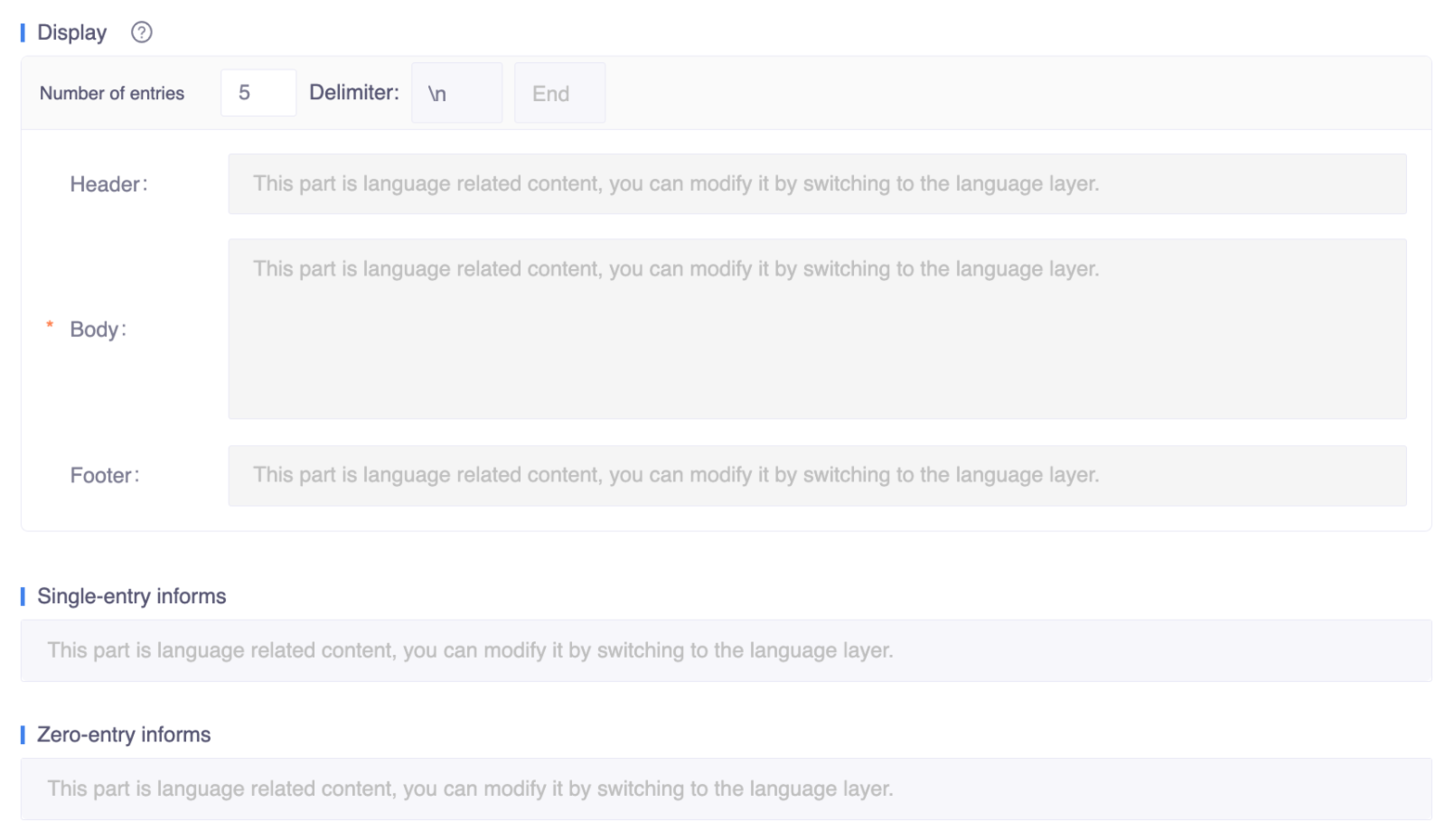
Display defines how the bot renders the list of options to the user. If the hard toggle is turned on, there are three different scenarios triggered by different result sets:
- Multiple entries: Indicates that multiple items were returned.
- Single entry: Means that there is only one item in the result set.
- Zero entry: Indicates that the return content is empty.
Otherwise, only the list scenarios will be shown.
Multiple entries
You can use the Multiple Entries module to provide a text list or a rich card experience at the JSON format level. To simplify the definition work, some default behaviors have been provided. If these default values can meet your application scenario, then you only need to pay attention to the header, body (which will be repeated based on the list), pagination configurations, and footer. These parts make up the main part of the display:
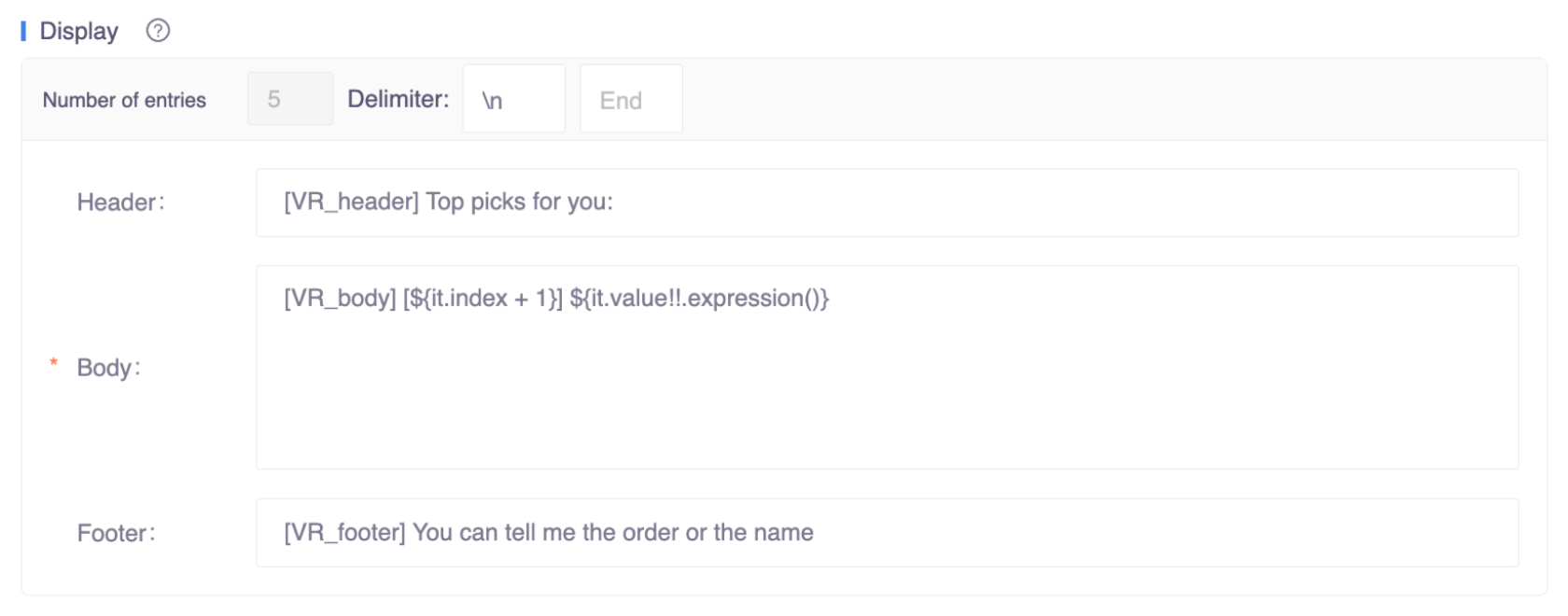
Number of entries: This field defines the number of items displayed per page. The default value is 5, but it can be modified to any value. However, the value should be considered with the channel that the bot will eventually deploy.
Delimiter: This field has two sub-fields:
- The first sub-field is used to define the delimiter between entries. The default value is \n, which indicates a line break.
- The second sub-field is used to define the delimiter of the last entry. It can be left empty if not needed.here are two fields
Header: This is a text area that defines the title content of the recommended card, such as "Top picks for you" or "Recommended for you".
Body: This is a text area with code expressions embedded. It defines the recommended content body, and the syntax of the body needs to follow certain rules:
kotlin
// index
${it.index + 1}  // index starts with 0, so should '+1';

// Entity type
${it.value!!.expression()}  // on platform, expressions[0] stands for expression

// Frame type
${it!!.value}- Footer: text area, which defines the last part of content.
Note
If you build a reusable component, these should be defined in a generic way so it can be used under different context.
Considerations
Here are the pros and cons to keep in mind when you decide whether to use Value recommendation.
| With value recommendation | Without value recommendation |
|---|---|
|
|
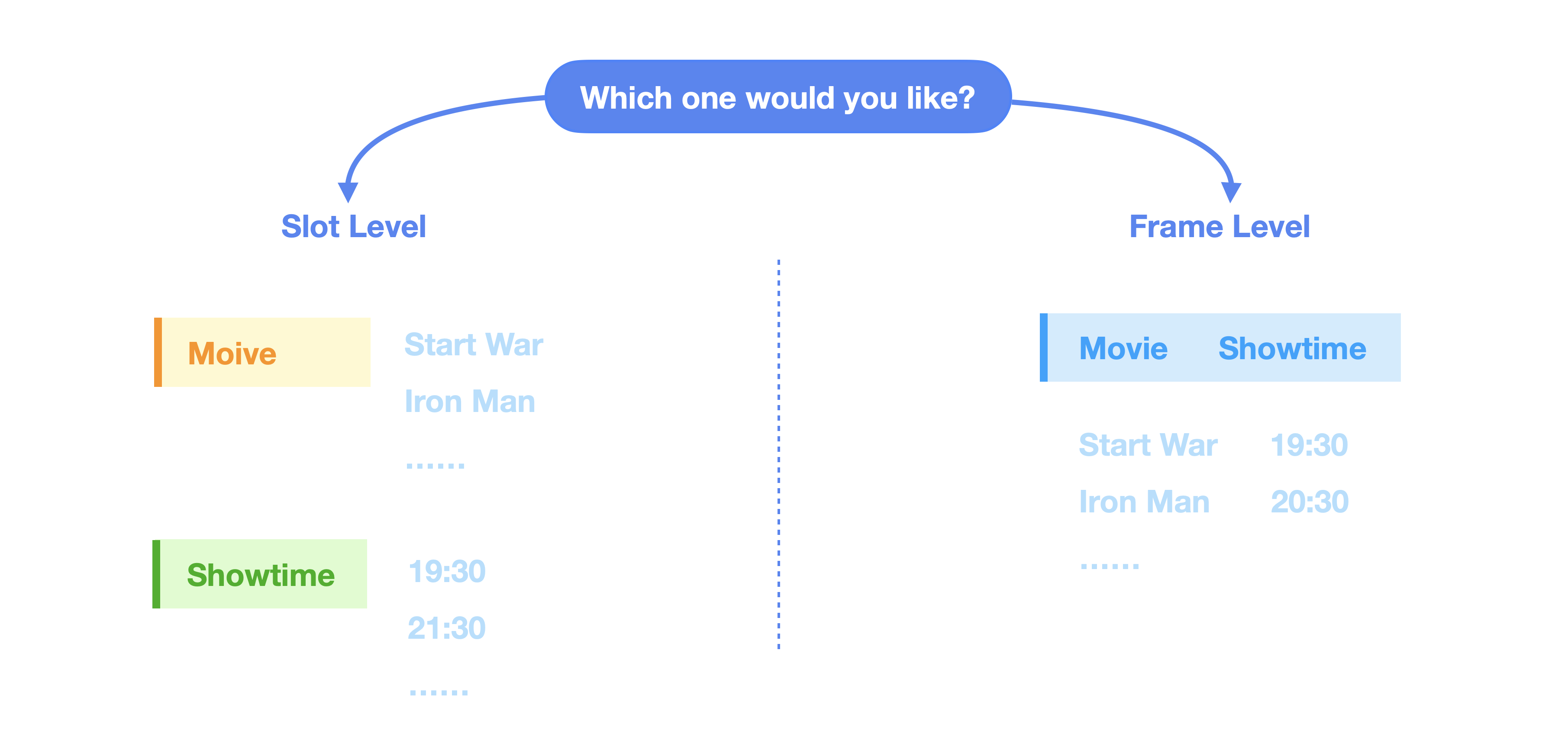
Value recommendation can be defined for slots with either an entity type or a frame type. You have to decide where to put it based on your business needs. - Entity slot: when slots are more or less independent, this gives users the ability to incrementally communicate what they want. - Frame slot: this is a more holistic approach, where we always recommend multiple slots simultaneously, and they will be filled together.
 Value recommendation on different levels