 OpenCUI
Appearance
Fill strategy
If a user does not specify which movie they want to watch when buying tickets, the bot needs to prompt the user to provide this information.
json
User: "Can I get two tickets for 8:00pm please?"
Chatbot: "Which movie? We have two options: Top Gun and Star Wars."
User: "Which movie has IMAX version?"
Chatbot: "Both. Which movie do you want to watch?"
User: "Top Gun, please."
Overview
Fill strategy is a required slot-level annotation that you can use to control when and how to prompt for a slot value. It decides whether or when to prompt the user to fill a slot. More importantly, it also defines how other fill annotations should work together. A prompt is a customization of the dialog act SlotRequest, and it contains a template that can help verbalize the slot request dialog act. The diversity of responses can be increased by adding more templates.
How to use
Prompt strategy is a composite annotation, as OpenCUI provides a set of concrete strategies to cover different use cases. Let's cover them one by one.
Always ask
Overview
The Always strategy means that if the user does not provide a value, the chatbot will always prompt the user for that slot. It is easy to set up:
- Set its Fill strategy to Always ask.
- Fill in at least one template in the Prompt text input box.
How to use
If a slot is required by the business logic, you should configure the prompt strategy to Always ask. The bot will make sure that this slot is filled. That means if a user has not mentioned their preference before, or their choice is not legitimate, the bot will prompt the user to ensure that there will be a value for the given slot.
Conditional
Not every slot is required. For example, when a user wants to watch a movie that does not have IMAX version, we should not be asking the user about it. For example, if the movie has the IMAX version, bot should behave this way:
json
User: "Can I get two tickets for 8:00pm Top Gun, please?"
Chatbot: "Do you want the IMAX version?"
User: "Yes, please."
Chatbot: ""
For a movie without IMAX version, bot should skip this question to avoid being silly.
json
User: "Can I get two tickets for 8:00pm NomadLand, please?"
Chatbot: "That will be $10. Please pay with ApplePay."
Overview
Conditional strategy allows the builder to specify a code expression to decide whether to prompt users for a given slot. As always, the slot used in this conditional expression should be earlier than the current slot, and bot behavior when referencing a later slot in the condition is not defined.
Like the Always strategy, the Conditional strategy is also orthogonal and imposes no constraints on other annotations in the slot filling pipeline when the condition expression evaluates to true. However, when it evaluates to false, the slot will be left unfilled and the bot will move on to the next slot or response.
Conditional strategy is easy to set up:
- Pick a slot, set its Fill Strategy to Conditional then, specify the Kotlin Boolean code expression in input box.
- Add template in Prompt so bot knows how to request information from user.
How to use
The Conditional strategy is useful for slots that are conditionally required. When a slot is required only under certain conditions according to business logic, you can use the Conditional strategy.
Gated
Sometimes, the information you want to collect from the user might be too sensitive or intrusive, so it is customary to ask for their permission to delve into details. For example, if you want to find out how long a patient has had a fever, whether it is intermittent or continuous, and what their highest recorded temperature was, it would be considered inappropriate to ask such questions directly without asking for the user's consent first.
json
Chatbot: "Since when have you had fever?"
User: "I don't have a fever. What are you talking about?"
Instead, it is useful to first introduce the topic before asking detailed questions about it.
json
Chatbot: "Do you have a fever?"
User: "Yes."
Chatbot: "Since when?"
Of course, user can say no so bot need to move onto next slot.
json
Chatbot: "Do you have a fever?"
User: "Nope."
Chatbot: "How about headache?"
Overview
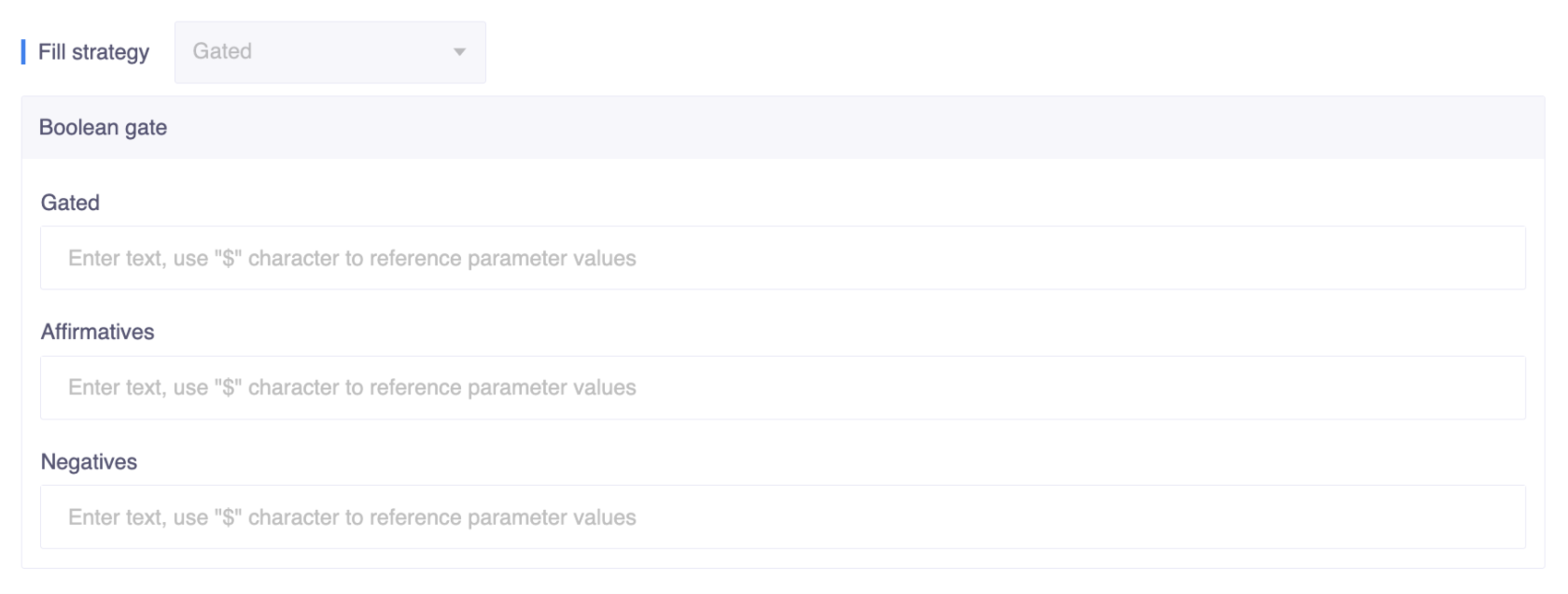
The Gated strategy can only be applied to frame slots. Therefore, to take advantage of this prompt strategy, you first need to define a frame to host closely related slots. Like the Conditional strategy, this choice is also orthogonal to other annotations in the slot filling pipeline.
The Boolean Gate will ask the user a yes-or-no question once and then wait for one of three types of answers.
- If the answer is 'Yes,' OpenCUI will follow the depth-first rule and start filling nested slots one at a time in their natural order.
- If the answer is a slot value, OpenCUI will assume the gate is open and start filling nested slots with user input.
- If the answer is 'No,' the frame slot will simply be skipped (neither asked nor filled)."
Set up gated strategy is easy, on a frame slot:
- Set its Fill Strategy to Gated then configure the detail for gated strategy:
- Prompt: template for boolean question that ask user whether he/she wants to or is able to provide slot value
- Affirmatives and Negatives: expression exemplars to help dialog understanding module, see Affirmatives and Negatives in Confirmation
- Provide at least one template for the Prompt of the origin slot.
How to use
When there is a complex subject with many details, it is more natural to use a boolean question as a gate to obtain user permission to go into the details. This can reduce user confusion and the effort required to deal with an unhappy conversation path.
Recover only
When a service option might only apply to a very small subset of users, such as wheelchair assistance, prompting every user for their choice is not a good user experience. However, when the initial value, either from user input or initialization, fails value check or confirmation, the bot needs to prompt the user for a new value.
json
Chatbot: "Two one way ticket from Beijing to New Yok on July 1st, is this all?"
User: "I need wheelchair assistance."
Chatbot: "Do you have your own mobility device or do you want airport wheelchair service?"
It is not appropriate to ask whether a user owns a mobility cart in general, but if the user mentions it first, we can go ahead and gather that information from them.
Overview
When a slot is configured to have a recovering prompt strategy, the bot will not prompt the user unless there has been some prior effort to fill it, either through initialization by the builder or prior mention by the user.
Configure the recover only is simple:
- Set its Fill Strategy to Recover only.
- Provide at least one template in original slot's Prompt.
How to use
The recover only strategy can be useful for the following use cases:
- When businesses have a default behavior or choice that could satisfy most users through initialization, but it does not gain user approval, this strategy kicks in.
- When businesses have a behavior or choice they do not want to promote, but still need to handle if it is required.
- When users say something that the bot cannot understand or offer a slot value that fails the value check or suggestion initialization fails to get user approval, a re-prompt is needed to request the slot value from the user again."
External event
Sometimes, the bot needs to rely on external events generated by trusted software to change the state of slot filling. For example, when the bot needs to wait for the user to execute some client action, such as payment, and only resume the conversation when the preconfigured third-party sends the expected events.
json
Chatbot: "Your order contains 10 roses. Please complete the payment at _www.payment-link.com_."At this point, conversation should be paused. The payment client action is configured so that payment service will send back event. Afte ther user finishes the payment action, bot will get that expected event and then resume the conversations:
json
Chatbot: "Payment completed. Thanks for your business."Overview
External events, by themselves, only mean blocking (though some information is allowed before blocking). It is the builder's responsibility to configure the trusted software to send an event to finish the blocked skill in the conversation.
Apart from that, if a business wants to interact differently depending on how well the client action has been done (e.g., successful, failed, or timed out), it needs to do some conditional branching with the hosting slot's value, just like it does with all the other slots. One typical place to do this is in the response.
To set a slot's prompt strategy to be external:
- Set its prompt strategy to External Event.
- Provide information: provide a template to inform the user of the conversation state.
- Configure the third-party software to send an event to resume the skill. Different third-party software have different mechanisms
How to use
Whenever the bot needs to work with external software, the external fill strategy is a good choice. Let the user know when the ball is in somebody else's court and this session is on pause, and restart with an updated status when it gets triggered by an external event.